How to back up digital vineyard records to meet retention requirements

TL;DR
- EPA Worker Protection Standard and most state pesticide laws require keeping application records for at least 2 years, with some states requiring 3 to 5.
- A 3-2-1 backup strategy (three copies, two media types, one offsite) is the practical standard for meeting those rules with digital files.
- Cloud sync alone is not enough.
What records does a vineyard legally have to keep, and for how long?
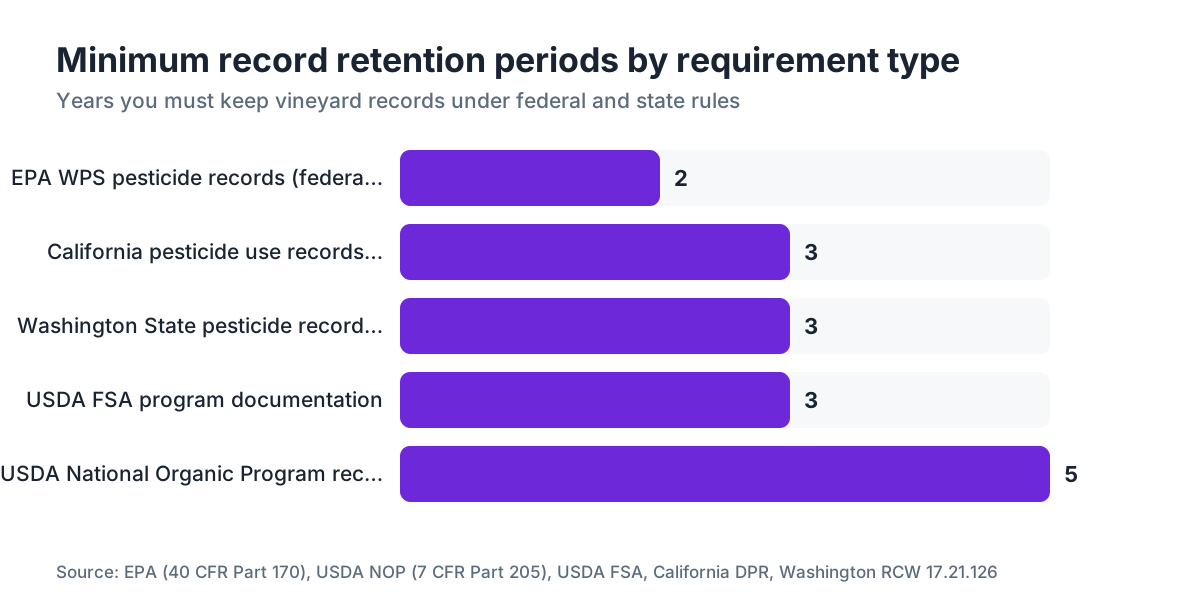
Federal law is the floor. The EPA Worker Protection Standard (40 CFR Part 170) requires agricultural employers to keep pesticide application records, including the product name, EPA registration number, active ingredient, amount applied, location, date, and applicator information, for at least two years from the date of application. [1] That two-year floor applies everywhere. Some states go further.
California's Department of Pesticide Regulation, for example, requires licensed pest control operators and agricultural operations to retain pesticide use records for three years. [2] Washington State, under RCW 17.21.126, requires pesticide application records to be kept for three years as well. [3] New York and Oregon are both two-year states at the operator level, though county agricultural commissioners in California can request records going back further in practice.
Beyond pesticides, you likely have other record categories with their own retention clocks. USDA Farm Service Agency program participants must keep supporting documentation for three years after the program year. [4] If you're Certified Organic, the National Organic Program (7 CFR Part 205) requires keeping all records that demonstrate compliance for five years. [5] Wine grape contract records, payroll, and I-9 employment forms all carry separate retention timelines under federal and state labor law.
A good working rule: plan your backup system around a five-year minimum for everything. That covers the longest plausible regulatory requirement you'll face and gives you a buffer if a dispute surfaces years after an application.
What are the actual risks if your digital records disappear?
Hard drives fail. Phones get stolen. Tablets fall into a fermentation tank. None of that is hypothetical. The average hard disk drive has an annualized failure rate between 1% and 5% depending on the model and age, based on Backblaze's ongoing drive reliability studies. [6] Over a three-year retention window, that failure probability compounds fast on a single device.
A DPR inspection in California doesn't accept "my iPad died" as a legal defense. Missing pesticide use records can trigger fines starting around $500 per violation per day in California, and repeated or willful violations can result in license suspension. [2] Federal WPS violations can draw civil penalties up to $19,866 per violation under 2023 inflation adjustments. [1]
Then there's organic certification. The National Organic Program says records must be "sufficient to demonstrate compliance," and a certifier who can't verify your spray history can decertify you mid-season. [5] That's not a hypothetical either. Certifiers do conduct unannounced inspections.
The real risk isn't a fine on the first missed record. It's that a gap in your backup history surfaces during a labor complaint, a pesticide illness claim, or a neighbor's drift dispute, and you have nothing to show your side of what happened.
What does a 3-2-1 backup strategy mean for vineyard records?
The 3-2-1 rule is the practical baseline IT professionals use: three copies of your data, stored on two different types of media, with one copy offsite. It's been endorsed by US-CERT (now CISA) as a standard approach for data resilience. [7]
For a small vineyard operation, it translates like this:
Copy 1: Your primary working location. This is your tablet, laptop, or field device where you enter spray records in real time. It's the most convenient and the most vulnerable.
Copy 2: A local backup on different hardware. An external USB hard drive or NAS (network-attached storage) device kept in your office or winery. This protects against device theft or failure. A reliable 1 TB external drive costs $50 to $80. That's enough to hold years of PDFs, spreadsheets, and photos.
Copy 3: Offsite or cloud storage. This protects against fire, flood, and the kind of disaster that takes out everything in a single building. Cloud services like Google Drive, Microsoft OneDrive, Dropbox Business, or agricultural-specific platforms handle this automatically once configured.
The single most common backup failure in small ag operations is having cloud sync set up but no verified local copy and no tested restore process. Cloud sync is not a backup. If you accidentally delete a file and don't notice for 31 days, most free-tier cloud services have already purged it from their trash. Pay for a plan with version history and test your restore process at least once a year.
Which file formats should you use for long-term vineyard record storage?
Format matters more than most growers think, because a proprietary file from software that no longer exists is effectively unreadable. The USDA and extension programs at UC Davis and Cornell both recommend exporting records to non-proprietary, stable formats for long-term storage. [8]
PDF/A is the archival-standard version of PDF (ISO 19005). It's self-contained, meaning fonts and images are embedded, and it's built to be readable without the original software. Use it for finalized spray records, field maps, and signed documents.
CSV (comma-separated values) is plain text and opens in any spreadsheet program. Good for application log exports and anything tabular.
JPEG or PNG for photos (tissue samples, field conditions, equipment calibration shots). Avoid proprietary RAW formats for archival copies.
Whatever software you use to record applications, make it a monthly habit to export your records to PDF and CSV. Drop those exports into your backup folder structure. Even if the software company folds or you switch platforms, you still have readable files.
Name files with dates first, in ISO 8601 format: YYYY-MM-DD. A file named 2024-06-15_block-3-sulfur-application.pdf is findable and sortable ten years from now. A file named "spray record (2).pdf" is not.
How should you organize backup folders to survive an audit?
An auditor doesn't have time to dig through a chaotic folder structure. Neither do you, at 7am when someone from the county shows up. Build your folders around the way inspections actually happen: by year, then by category.
A structure that works:
/Vineyard_Records
  /2024
    /Pesticide_Applications
    /WPS_Compliance (SDS sheets, handler training, posting records)
    /Irrigation_Logs
    /Scouting_Reports
    /Organic_Certification (if applicable)
    /Labor_Records
  /2023
    ...
Keep a single index file, a one-page PDF or spreadsheet, at the top of each year's folder listing every application by date, block, and product. An inspector can confirm completeness in two minutes. It also helps you find a specific record when someone asks three years later about a particular spray event.
For physical verification, UC Davis Cooperative Extension recommends keeping a printed or laminated summary of your WPS information at a central location in addition to digital records, because inspectors may want to check posting requirements without going through a laptop. [8] The digital backup handles the retention requirement. The physical posting handles the daily access requirement. They're different obligations.
What cloud backup services actually make sense for a small vineyard?
You don't need an enterprise solution. You need something you'll actually keep running.
| Service | Storage included | Versioning (free tier) | Versioning (paid) | Rough annual cost |
|---|---|---|---|---|
| Google Drive | 15 GB | 30 days | 180 days (Business) | $72, $144/yr (Business Starter) |
| Microsoft OneDrive | 5 GB | 30 days | 180 days (Business) | $60, $120/yr |
| Dropbox | 2 GB | 30 days | 180 days (Plus/Business) | $120, $200/yr |
| Backblaze B2 + client | Pay-as-you-go | Unlimited | Unlimited | ~$12, $30/yr for most ag use |
For most operations under 50 acres, Google Drive or OneDrive Business gives you enough versioning depth for a five-year retention window if you pair cloud sync with a local backup. Backblaze's personal computer backup service ($99/year) is the best value if you want unlimited versioning depth for a single machine.
Three things to check before choosing: versioning depth (how far back you can recover a deleted or overwritten file), whether the service has a desktop sync client that runs on its own, and whether you can restore individual files without an active subscription.
If you're running a more formal operation and want an ag-specific record-keeping system that handles the spray record format, field mapping, and export requirements in one place, platforms like VitiScribe are built around vineyard compliance workflows and include document export to archival formats.
How often should you back up vineyard records, and when should you verify them?
Daily sync is the right default if you're entering records digitally in the field. Most cloud sync clients run continuously or on a 15-minute cycle, so this takes no manual action once configured. The gap to close is your local backup.
For your local external drive backup, a weekly automated backup is realistic and enough for most operations. Windows has built-in File History. macOS has Time Machine. Both point at an external drive and run without you touching them. Set it up once, let it run.
What most people skip: verification. A backup that hasn't been tested is a guess. Once a year, restore a specific file from each of your three backup locations and confirm it opens correctly. Do this in January when you're doing your annual record summary anyway.
Cornell Cooperative Extension's guidance for agricultural record retention says electronic records must be "legible, retrievable, and complete" to satisfy regulatory purposes, not merely stored somewhere. [9] A file that's corrupted or saved in a format nothing can open is legally the same as no record at all.
Schedule three calendar reminders:
- Monthly: Export spray records to PDF/CSV, file into backup folder.
- Annually (January): Verify restore from all three backup locations.
- Annually (January): Confirm your retention clock. Any records from five-plus years ago can move to cold storage or be deleted per your retention policy.
What do WPS requirements specifically say about electronic record access?
The 2015 revised WPS rule (effective January 2017) requires agricultural employers to make pesticide application information available to workers and handlers within two days of a request, and to emergency medical personnel immediately. [1] The law doesn't prescribe paper or digital. It requires access.
The EPA's agricultural employer fact sheet states that "records can be kept in any format, including electronic," but you must be able to produce them within the required timeframe. [1] So your backup system needs to support retrieval, more than storage. A file in cold storage that takes three days to pull fails the two-day access requirement.
In practice, your most recent two years of spray records should live in accessible, warm storage: your local device and a cloud folder you can open from any browser. Older records can go to slower, cheaper storage.
WSU Extension's pesticide record-keeping guide notes that Washington handlers must be able to produce records for any 24-hour period within the last three years on request. [3] Keep that in mind when you design your retrieval workflow. Know which folder to open, and be able to open it in two minutes, not two hours.
The EPA also requires posting specific application information in a central location (the application-specific details workers might need before entering a treated field), but that posting obligation is separate from the record-keeping obligation. Both apply.
How do organic certification records fit into your backup plan?
National Organic Program regulations (7 CFR Part 205.103) are direct: organic operations must maintain records for at least five years. [5] Those records must cover every field activity that could affect organic integrity: inputs used, sources of inputs, field activities, harvest records, and sales records.
The record types that trip up small organic vineyards are the ones that feel like routine paperwork: receipts for approved inputs, labels from purchased organic amendments, even incoming water test results if you're making water quality claims. All of it belongs in your backup system.
USDA-accredited certifiers can and do request multi-year document pulls. A five-year backup with good folder organization (by year and category) means you can produce a requested year in minutes rather than hours.
One practical habit for organic operations: scan every input receipt and product label at the time of purchase. Store the scan in the folder for that crop year. This sounds obvious. It's consistently the piece missing when certifiers ask for proof of input approval. The physical label from that specific lot shows the certifier that what you bought is what you claim to have used.
What's the fastest way to set up a working backup system if you have nothing right now?
An hour of setup today beats a frantic scramble during an inspection. Here's the sequence that works for an operation starting from scratch.
Step 1 (15 minutes): Pick one cloud service and install the desktop client. Google Drive, OneDrive, or Dropbox all work. Sign up for a paid tier with at least 180 days of version history. Install the sync client on your main computer.
Step 2 (10 minutes): Create your folder structure. Set up the year/category structure described above. Put it inside your cloud sync folder so everything syncs automatically.
Step 3 (20 minutes): Back-fill existing records. Gather whatever spray records you have, scan any paper records with your phone (Google PhotoScan, Microsoft Lens, or your phone's built-in scanner all produce decent PDFs), and file them into the appropriate year folders.
Step 4 (10 minutes): Buy and configure a local backup drive. Plug in an external drive, enable Time Machine (Mac) or File History (Windows), and point it at your documents folder. Confirm the first backup runs before you walk away.
Step 5 (5 minutes): Set calendar reminders for your monthly export habit and annual restore test.
Total time: under an hour. Total hardware cost: $50 to $80 for the external drive. Ongoing cost: $60 to $150 per year for cloud storage, depending on the service and tier.
For operations that want record entry, field mapping, and backup all in one place, VitiScribe is worth a look as a purpose-built alternative to managing spreadsheets and scan folders by hand.
What about paper records? Do you still need them if everything is digital?
Mostly no, with two exceptions. First, your WPS central posting (handler training records, emergency medical information, SDS sheets) must be physically accessible to workers who may not have a digital device. That's a separate WPS posting obligation, not a record-keeping obligation, and it requires physical or at-a-glance access. [1]
Second, some county agricultural commissioners and certifiers still request paper originals or wet signatures on specific forms. Know your local rules. Call your county ag commissioner's office once and ask: do you accept electronic spray records for inspection, and if so, do you have a format preference? You'll get a straight answer and save yourself the guessing.
For everything else, the federal standard is format-neutral. The EPA, USDA, and state agencies asked this question consistently say electronic records satisfy the retention requirement as long as they're legible, complete, and retrievable. The practical risk of going fully digital isn't legal, it's operational: a dead device at the wrong moment. The 3-2-1 backup strategy solves that.
If you want to keep one paper binder per season as a redundant backup, that's not a bad habit. Just don't let the paper binder become your primary system and the digital copy become the thing nobody updates.
Frequently asked questions
How long do I have to keep pesticide application records for my vineyard?
Federal law (EPA WPS, 40 CFR Part 170) requires at least two years from the date of application. California requires three years under DPR regulations. Washington State requires three years under RCW 17.21.126. Organic operations under the USDA National Organic Program must keep records for five years. Build your system around five years minimum to cover all scenarios.
Can I keep all my vineyard spray records digitally, or do regulators require paper?
Digital records are legally acceptable under the EPA WPS rule and in most state programs. The EPA explicitly states records can be kept in any format including electronic. The requirement is that records are legible, complete, and retrievable within the required timeframe (typically two business days for WPS access requests). Check with your county agricultural commissioner for any local paper requirements.
What happens if I lose my spray records and a DPR inspector shows up?
In California, missing pesticide use records can result in fines starting around $500 per violation per day. Repeated violations can trigger license suspension. Under the EPA WPS, civil penalties can reach $19,866 per violation under 2023 inflation-adjusted amounts. Beyond fines, missing records eliminate your ability to defend against pesticide drift disputes, illness claims, or denial of organic certification.
Is cloud sync the same as a backup for vineyard records?
No. Cloud sync mirrors your current files, but if you delete a file or overwrite it, that deletion also syncs. Free-tier cloud services typically retain deleted files for only 30 days. A real backup requires version history (paid tiers typically offer 180 days) plus at least one additional copy on separate hardware. Sync handles convenience; a 3-2-1 backup strategy handles compliance.
How many years of records does USDA organic certification require?
The National Organic Program (7 CFR Part 205.103) requires all records demonstrating compliance to be kept for five years. This covers input purchase receipts, field activity logs, harvest records, and sales records. Certifiers can request records from any year within that window during scheduled or unannounced inspections.
What file formats are best for storing spray records long term?
PDF/A is the archival-grade format for finalized records: it embeds fonts and images and opens without the original software. CSV (plain text) works well for tabular spray logs. Avoid proprietary formats tied to specific software versions. Export to PDF and CSV monthly, file by date using YYYY-MM-DD naming, and you'll have records that stay readable indefinitely regardless of software changes.
How do I back up vineyard records if I only use paper right now?
Scan paper records using any smartphone scanning app (Google PhotoScan, Microsoft Lens, or built-in phone scanning) to create PDF files. File them into a dated folder structure on your computer, then sync that folder to cloud storage and an external drive. Going forward, switching to digital entry at the point of application is faster than back-scanning and reduces transcription errors.
What does the EPA WPS say about providing records to emergency medical personnel?
Under 40 CFR Part 170, agricultural employers must make pesticide application information available to emergency medical personnel immediately upon request, with no waiting period. For workers and handlers making a personal information request, the timeframe is two business days. Your backup system must support immediate retrieval of recent records, more than archival storage.
How often should I test my vineyard record backup to make sure it works?
Test at minimum once a year. Restore a specific file from each of your three backup locations (local device, external drive, cloud) and confirm it opens correctly. Cornell Cooperative Extension notes that electronic records must be 'legible, retrievable, and complete' for regulatory purposes. A backup that can't be restored is the same as no backup from a compliance standpoint.
Do I need to back up SDS sheets and WPS training records too, more than spray logs?
Yes. WPS compliance records include worker and handler training documentation, application-specific information posted at the central location, and Safety Data Sheets for products used. All of these are subject to the two-year minimum retention requirement under 40 CFR Part 170. Keep digital copies filed with your annual spray records so everything for a given season is in one place.
What record-keeping requirements apply to USDA FSA program participants?
USDA Farm Service Agency program participants are generally required to retain records supporting program payments and certifications for three years after the applicable program year. If an FSA review or appeal is pending, retain records until it resolves regardless of the three-year clock. Check your specific program's provisions, as commodity and conservation programs can have different requirements.
How much does it cost to set up a compliant backup system for a small vineyard?
Hardware cost is $50 to $80 for a reliable 1 TB external drive. Cloud storage with adequate version history runs $60 to $150 per year depending on the service tier. Total first-year cost is typically $110 to $230. This is a one-time setup of under an hour and ongoing annual cost well below the minimum fine for a single missing pesticide record.
Can I use my phone as one of my backup locations?
A phone can serve as a primary entry device with cloud sync, but it shouldn't count as an independent backup location. Phones are high-risk: they're lost, stolen, and damaged far more often than dedicated backup drives. Use your phone for field data entry that syncs automatically to cloud storage. The cloud copy and your external drive are your two reliable backup legs.
What should my folder structure look like to survive a regulatory inspection?
Organize by year at the top level, then by category within each year: Pesticide_Applications, WPS_Compliance, Organic_Certification, Labor_Records, Scouting_Reports. Keep a one-page index file in each year's folder listing every application by date and block. An inspector should be able to confirm completeness in under two minutes without hunting through folders.
Sources
- EPA, Agricultural Worker Protection Standard (40 CFR Part 170): WPS requires pesticide application records to be kept for at least two years and made available to workers within two days and to emergency medical personnel immediately; records can be kept in any format including electronic.
- California Department of Pesticide Regulation, Pesticide Use Reporting: California requires pesticide use records to be retained for three years; violations can result in fines and license suspension.
- Washington State University Extension, Pesticide Record-keeping Requirements: Washington State requires pesticide application records to be kept for three years and produced on request for any 24-hour period within that window.
- USDA Farm Service Agency, Record Retention Requirements: USDA FSA program participants must retain supporting documentation for three years after the applicable program year.
- USDA National Organic Program, 7 CFR Part 205.103: Organic operations must maintain all records demonstrating compliance for five years; records must be sufficient to demonstrate compliance with NOP regulations.
- Backblaze, Hard Drive Reliability Statistics: Annualized hard disk drive failure rates range from approximately 1% to 5% depending on model and age, based on Backblaze's ongoing fleet data.
- CISA (formerly US-CERT), Data Backup Options: CISA endorses the 3-2-1 backup approach (three copies, two media types, one offsite) as a standard method for data resilience.
- UC Davis Cooperative Extension, Vineyard and Winery Record Keeping: UC Davis Cooperative Extension recommends exporting records to non-proprietary formats for long-term storage and keeping a printed WPS summary at a central location in addition to digital records.
- Cornell Cooperative Extension, Agricultural Record Retention Guidance: Cornell Cooperative Extension guidance states that electronic records must be legible, retrievable, and complete to satisfy regulatory purposes.
- Washington State, RCW 17.21.126, Pesticide Application Records: Washington State law RCW 17.21.126 specifies the three-year pesticide application record retention requirement for pesticide applicators.
Last updated 2026-07-11